Drop Down MenusCSS Drop Down MenuPure CSS Dropdown Menu

Tuesday, 18 July 2017

Simple program

Simple program #8 (Source code to print prime number from x to y)

Enter starting number: 1
Enter last number: 50
O/p:
List of prime number:
2 3 5 7 11 13 17 19 23 29 31 37 41 43 47

The program is written in C# programming language and will accept a starting number and a ending number as input. The logic of the program is to find the prime number between these two numbers.
 
Simple program by imagination hunt
Simple program

Note: If you are new to C# and Console Application. Try to code First C# Program

Note: Read articles on how to use Loops and Conditions.

Let’s find out a simple and easy way to code the program.

Practical Implementation:

using System;

namespace patternProblem.Simple_program
{
    class Simple8   //print prime number from x to y
    {
        static void Main(string[] args)
        {
            Console.Write("Enter starting number: ");
            int startNumber = Convert.ToInt32(Console.ReadLine());
            Console.Write("Enter last number: ");
            int lastNumber = Convert.ToInt32(Console.ReadLine());
            int i = 0;
            int j = 2;
            int count = 0;
            Console.WriteLine();

            Console.WriteLine("-----Output-----");
            Console.WriteLine();

            Console.WriteLine("List of prime number: ");
            for (i = startNumber + 1; i < lastNumber; i++)
            {
                for (j = 2; j < i; j++)
                {
                    if (i % j == 0)
                    {
                        break;
                    }
                }
                if (i == j || i == 1)
                {
                    Console.Write(i + " ");
                    count++;
                }
            }
            Console.WriteLine(); Console.WriteLine();
            Console.WriteLine("Total prime number found: " + count);

            Console.ReadKey();
        }
    }
}

Output:
The input numbers are 1 and 50. The program will find all the prime number between these two numbers. The output is shown below:

Enter starting number: 1
Enter last number: 50
List of prime number:
2 3 5 7 11 13 17 19 23 29 31 37 41 43 47
Press any key to continue . . .


For any query, comment us below.

Skip to Main Table Simple program

Previous - Simple program #7

Next – Simple program #9

Click imagination hunt to read latest blogs.


Keep learning and sharing...
Read More »

String based program

String program #15 (First reverse the string than make the even position character to upper case)

Enter String: imagination
O/p: -
Reverse String: noitanigami
Reverse String: NoItAnIgAm

The program for the string is written in C# programming language and will accept a string as input. The logic is to make the even position character to upper case.
 
String based program by imagination hunt
String based program

Note: If you are new to C# and Console Application. Try to code First C# Program

Note: Read articles on how to use Loops and Conditions.

Let’s find out a simple and easy way to code the program.

Practical Implementation:

using System;

namespace patternProblem.String
{
    class String15      //First reverse the string than make the even position characters to upper case
    {
        public static void Main()
        {
            Console.Write("Enter String: ");
            string str = Console.ReadLine();

            String15 obj = new String15();

            //this line make the string in reverse direction
            string reverseStr = obj.strReverse(str);
            Console.WriteLine("Reverse String: {0}", reverseStr);

            char[] ch = new char[reverseStr.Length - 1];
            for (int i = 0; i < reverseStr.Length - 1; i++)
            {
                if (i % 2 == 0)
                {
                    //Even position
                    ch[i] = Char.ToUpper(reverseStr[i]);
                }
                else
                {
                    //Odd position
                    ch[i] = reverseStr[i];
                }
            }

            string strUpper = new string(ch);
            Console.WriteLine("Reverse String: {0}", strUpper);
        }

        public string strReverse(string inputStr)
        {
            string str = inputStr;

            char[] ch = str.ToCharArray();

            //In-built menthod to reverse the string
            Array.Reverse(ch);
            return new string(ch);

            //User-defined logic to reverse the string
            //for (int i = str.Length - 1; i >= 0; i--)
            //{
            //    rev += str[i].ToString();
            //}
            //return rev;
        }
    }
}

Output:
Based on the input, program will first reverse the string and then make the even position character to upper case. The output is shown below:

Enter String: imagination
Reverse String: noitanigami
Reverse String: NoItAnIgAm
Press any key to continue . . .


For any query, comment us below.

Skip to Main Table String based program

Previous - String based program #14

Next – String based program #16

Click imagination hunt to read latest blogs.


Keep learning and sharing...
Read More »

Monday, 17 July 2017

Introduction to Web Services


Introduction

In this Web service article series, we will learn about - What Asp.net Web services are? And How to create and consume web services in a client application?

What is Asp.net Web Services?

Asp.net Web services is a communication strategy by which two applications present at the same or different location can communicate easily as long as they are connected by a network.
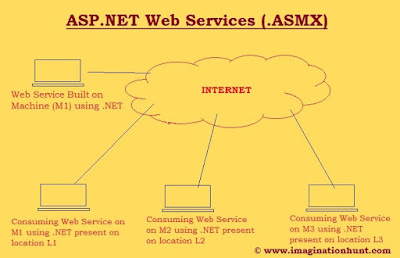
 
Introduction to web services by imagination hunt
Asp.Net Web Services

Web services are created with an extension of .asmx. Hence, Asp.net Web services are also known as ASMX services. Here, .asmx stands for Active server method extension. Web services came into play when we need to access some method which can be present on the same computer or the different computer.

Web services worked on open standard & protocols. They used SOAP web protocol. SOAP enables an operating system to communicate data written in XML over HTTP. XML (i.e. Extensible Markup Language) which is platform independent language to send data over internet and HTTP protocol is for sending and receiving messages over the internet. For example- Suppose I create a web service in Java which can be used by the application built using .Net. And also services built on .Net can be consumed by Java application.


Some related terms and concept in web services: -

o   ASMX: Active Server Method Extension. ASMX services give a way for developing interoperable application i.e., enabling an application to invoke a method of another application.

o   TCP/IP: TCP/IP is a combination of two separate protocols- Transmission Control Protocol and Internet Protocol. This is the basic communication protocol or language of the internet. Three most commonly TC/IP protocol:

o   HTTP: Hyper Text Transfer Protocol is used to send and receive messages, over non-secure data transmission. A web client (browser) sends a request message to the web server. The web server receives the request and sends the response back to the web client.

o   HTTPS: HTTP functionality is enhanced by providing secure data transmission. Information like account details and bank transaction need to done using this from client to server.

o   FTP: File Transfer Protocol is used to send files directly from one computer to other.

o   SOAP: SOAP stands for Simple Object Access Protocol. SOAP protocol is used to provide enveloping the message which needs to be transmitted over the network. SOAP envelope contains two parts: 

SOAP by imagination hunt
SOAP Architecture
 
o   SOAP Header: Provide information about the message authentication, encoding the data and how the receiver should process the message.

o   SOAP Body: SOAP body contains data in WSDL document. It contains methods that are exposed by the web service, the parameter, and their types and return types of the methods.

The message format of SOAP usually relies on HTTP and uses other protocols of different application layers. Among these the most notable application layer is Remote Procedure Call (RPC) and HTTP. SOAP forms the foundation layer for web services.

o   WSDL: Web Service Description Language which is pronounced as Wis-del. This is used to describe a web service based on XML. WSDL contains all information about the service, its residing location and the way of consuming the service.

o   UDDI: UDDI Stands for Universal Description Discovery and Integration. This is used to publish and discover the information about the web services. It is an XML based standard.

o   Serialization: Serialization is the process of converting an object into a stream of bytes so that it can be transported across the network and in order to store the object into the CACHE memory, a database or file. Its main aim is to save the state of an object in order to be able to recreate it when needed.

o   De-serialization: The reverse process of serialization is called deserialization. The information in bytes is again recollected into the object. When the object is deserialized, an exact copy of the original object is created.

o   Uses of Serialization: Usages of serialization perform various actions: -

o   Sending the object to a remote application by means of a web service,

o   Passing an object from one domain to another,

o   Passing an object through the firewall as an XML string

o   Maintaining security or user specific information across an application.

o   Namespace: The System.Web.Services.WebServices; namespace is used to build web service.

o   Is XML case sensitive or not?
Yes, XML tags are case sensitive. The tag <Header> is different from the tag <letter>. Opening and closing tags must be written with the same case.

For example-
///This is incorrect way to writing XML tags.
<Letter>Hello, Imagination hunt Readers<letter>

///This is correct way to writing XML tags.
<Letter>Hello, Imagination hunt Readers<Letter>

“Opening and closing tags” are often referred to as “Start and End tags”.


For any query, comment us below.


Next – Asp.net Web Services #2

Click imagination hunt to read latest blogs.


Keep learning and sharing...
Read More »

Featured post

Think that makes you rich and richer

 Napolean said: “You can think and grow rich, but if you can be brought up like most people with work and you won't starve, this wil...