Drop Down MenusCSS Drop Down MenuPure CSS Dropdown Menu
Showing posts with label Technology. Show all posts

Monday, 6 January 2020

High Voltage System - Reason for having High Voltage System On board ships


As we already know about the voltages used onboard a ship. It is usually a 3phase, 60Hz, 440 Volts supply being generated and distributed onboard ship.

  1. Higher power requirement on board ship is the foremost reason for the evolution of HV in ships.
  2. Higher power requirement has been necessitated by development of larger vessel required for containers transport particularly reefers containers and cruise vessels.
  3. Gas carriers needing extensive cargo cooling electric propulsion.
  4. For a ship with large electrical power demand, it is necessary to utilize the benefits of a high voltage installation.


The design benefits relate to the simple ohms laws relationship that current (for a given power) is reduced as the voltage is increased. Working at high voltage onboard ship significantly reduces the relative overall size and weight of electrical power equipment.


When Heavy loads are connected to the Low voltage system the magnitude of current flow becomes too large resulting in overheating due to high iron and copper losses.

P = V * I * COS(Φ)

Copper losses = I^2 * R (KW)

Already High Voltage levels of 3.3 KV, 6.6 KV and 11 KV are regularly employed ashore for regional power distribution and industrial motor drives.

For example, a motor (let us assume a bow thruster), maybe a smaller size if it designed to operate on 6600 Volts. For the same power, the motor would be of a smaller size if is designed for 6600 Volts when compared to 440 Volts.

Thus these are the major reasons why recent ships have shifted towards the high voltage systems. The main disadvantage Highlighted by the owner, when working in an HV installation, is the very necessary adherence to stringent safety procedures.

Advantages:

  1. For a given power, higher Voltage means Lower current, resulting in:
  2. Reduction in size of generators, motors, cables, etc.
  3. Saving of space and weight.
  4. Ease of Installation.
  5. Reduction in cost of Installation.
  6. Lower losses- more efficient utilization of generated power.
  7. Reduction in short circuit levels in the system which decides the design and application of the electrical equipment used in the power system.


Disadvantages:

  1. Higher Insulation Requirements for cables and equipment used in the system.
  2. Higher risk factor and the necessity for strictly adherence to stringent safety procedures.


Read More »

Thursday, 5 October 2017

How to check PC has a precision touchpad?

Precision touchpads are new inventions of Windows. They give you an efficient way of working without a mouse click.


To find out whether your PC or laptop has a precision touchpad, Go to Settings -> Devices -> Touchpad. Look for the message, "Your PC has a precision touchpad." Turn the switch ON to enable touchpad.


If you want to disable touchpad gestures turn the switch off.

Hope you find the article helpful.


For any query, comment us below.


Click imagination hunt to read latest blogs.


Keep learning and sharing...
Read More »

Touchpad shortcut in Windows 10

Hey, folks this time Windows come up with some new and interesting Touchpad gestures which make you feel really excited. And in this article, I am excited to share those awesome touchpad shortcuts with you. If you haven’t try those then get set ready to make your work efficient without clicking the mouse buttons.


(1) Single click: Tap with a single finger to select an item.
(2) Right-click: Tap the touchpad with two fingers.
(3) Drag and Multi-select: Tap the touchpad twice with a single finger and drag to select multiple lines.
(4) Scrolling: Tap the touchpad with two fingers gently and slide horizontally or vertically.
(5) Zoom in or out: Place two fingers gently on the touchpad and pinch in or stretch out.
(6) Drag windows: Double-tap the touchpad and drag the menu bar (top of app window).
(7) Show Task view: Place three fingers on the touchpad and swipe them vertically up.


(8) Show the desktop: Place three fingers on the touchpad and swipe them vertically down.
(9) Switch between open windows: Place three fingers on the touchpad and swipe right or left.
(10) Cortana: Tap the touchpad with three fingers and Cortana will pop-up from lower left corner.
(11) Action Center: Tap the touchpad with four fingers and Action Center will pop-up from lower right corner.


Hope you find the article helpful.


For any query, comment us below.


Click imagination hunt to read latest blogs.


Keep learning and sharing...
Read More »

Sunday, 24 September 2017

How to view computer hidden files in Windows 10, 8.1, 8, 7 and XP?

In Windows, to view hidden files are quite easy. In this article, we will see how to view hidden files and folders in Windows 10, 8.1, 8, 7, and XP.

Note: Hidden files and folder appear lighter in color than normal files.

Windows 10/8.1/8

To view hidden files in Windows 10/8.1/8 follow these steps:
 
Hidden files image 1

1)    Open My Computer or Press Window key and E.
2)    In the Menu Bar click ‘View’ tab located in top left corner of the screen.
3)    Check the Hidden items field.
4)    And you are done. The hidden files automatically become visible to you in a lighter color.

Windows 7

To view hidden files in Windows 7 follow these steps:
 
Hidden files image 2

1)    Open My Computer or Press Window key and E.
2)    In the Tool Bar click ‘Organize’ button located in top left corner of the screen. Select folder and search options.
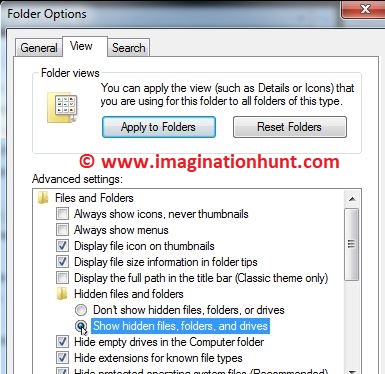
3)    A Folder Options dialog box open. Click the ‘View’ tab.
4)    Select show hidden files, folders, and drives. Click ‘Ok’ button to save the settings.
5)    And you are done. The hidden files automatically become visible to you in a lighter color.

Windows XP

To view hidden files in Windows XP follow these steps:
 
Hidden files image 3

1)    Open My Computer or Press Window key and E.
2)    In the Menu Bar click ‘Tools’ tab located in the top left corner of the screen and then Folder options.
3)    A Folder Options dialog box open. Click the ‘View’ tab.
4)    Under Advanced settings. Select show hidden files, folders, and drives. Click ‘Ok’ button to save the settings.
5)    And you are done. The hidden files automatically become visible to you in a lighter color.


Hope you find the article helpful.


For any query, comment us below.

Previous – Top 10 Run Commands #6


Click imagination hunt to read latest blogs.


Keep learning and sharing...
Read More »

Wednesday, 1 March 2017

How to make money online without investment

Everyone needs money. Money is the basic necessity in every phase of life. In this article, we’ll discuss the five websites by which you can earn money online.


1.SliceThePie:

SliceThePie is the website you can use to rate and review music and at the same time earn money. By simply listening to the songs and giving a rating from 1 to 10 rating along with a few words explaining what you like or what you didn't like about that song. The amount of money for each song you rate varies. Sometimes you can get 18 cents and sometimes around 6 cents. So if you are a music lover then try this website for listening music and to earn money.

2.Fiverr:

Fiverr is the huge marketplace where people post services which they willing to provide for $5 dollars. Fiverr has actually provided potential that you can earn a lot of money. Many people do actually make their living from this website and if you are wondering what kind of services to offer, then take look at people what they are offering and according to that find the sector in which you are highly skilled. Fiverr pays you through PayPal.

3.Mylikes:

If you are very active on social media like facebook or twitter, then you can earn money by sharing links to Mylikes. You can signup with Mylikes even when you are 13 years old. They pay through paypal with the threshold amount of $1.

4.Qmee:

Qmee is the awesome website for kids who want to earn while browsing. You can installed the extension on any browser. Once install, sometimes Qmee shows sponsored advertisement on the website you are searching. Each advertisement pays you a certain amount, usually few cents or more. If you visited any of the advertisement you see the pop-up open and you will get that cash into your account automatically. They will payout instant to PayPal no matter how much is in your account.

5.MySurvey:

MySurvey is the website that pays you for online survey. If you like to do anything at the spare time, then this is the website. For each survey you complete you get some points and you can redeem these points through PayPal cash and gift cards.

Click imagination hunt to read latest blogs.


Keep learning and sharing...
Read More »

Saturday, 14 January 2017

Top 10 iPhone and iPad Games

There are millions and millions of games on iOS and sometimes it is extremely difficult to find best one. Well Today we are taking  about people personal  experience of Top 10 iOS games in this year. These games can be played across i phone, iPad. Please note through  this list makes you much excited. If you are struggling to which iOS game to buy, then you are at the right place.

10. NEON CHROME 
(PLAYSCORE RATING; 9.00), ($9.99)
Download from here: https://goo.gl/rlhHO3


9. GOOD KNIGHT STORY 
(PLAYSCORE RATING; 9.00), (Free)
Download from here: https://goo.gl/ayVPVh


8. JURASSIC GO  
(PLAYSCORE RATING; 9.00), ($3.99)
Download from here: https://goo.gl/H7t2Dn


7. MINI METRO 
(PLAYSCORE RATING; 9.01), ($9.99)
Download from here: https://goo.gl/sLg6ja


6. STEAMWORLD HEIST 
(PLAYSCORE RATING; 9.05), ($7.99)
Download from here: https://goo.gl/rfFIde


5. BULLET HELL MONDAY
(PLAYSCORE RATING; 9.10), (Free)
Download from here: https://goo.gl/tBy3lC


4. DAN THE MAN 
(PLAYSCORE RATING; 9.14), (Free)
Download from here: https://goo.gl/7oie3g


Dan the Man is a fabulous game. This game is completely free so check out now!!. The story of this game is too interesting, when you start playing you start loving characters. 

3. SPACE MARSHALS 2 
(PLAYSCORE RATING; 9.24), ($5.99)
Download from here: https://goo.gl/zGOGGw


Space Marshals 2 is made by pixelbite. It is a tactile shooter game, where you have to used strategy to move around and shoot enemies. One of the best thing about this game, is his controls.

2. SEVERED 
(PLAYSCORE RATING; 9.41), ($6.99)
Download from here: https://goo.gl/D7w7ct


1. CRASHLANDS 
(PLAYSCORE RATING; 9.64),  ($4.99)
Download from here: https://goo.gl/iTTCNn

Crashlands is also one the most addictive game ever made. This game is joy to play. It is large expensive game especially for mobile game. Story of Crashlands is to simple. Player Ship is destroyed by a giant head then the whole game is about his survival, This game has a long story filled with different character with motivational story.

Share your Favorite game... ⇓


Read More »

Thursday, 12 January 2017

Best Smartphone Awards

Hi friends!!
Today I am going to review some of the best smartphones around town. Lots of gadget updates happened in the previous year for the better and the worst and various smartphones and other gadgets were launched. This article is the one stop shop for picking up one of the best smartphone according to your taste and style. So, look no further as I am here to save you from some trouble. Read ahead and find the best one suited for you.

Among all the releases witnessed in 2016, I have categorized the products according to their features and performance and allotted the ranks respectively.

1) Best Big Smart Phone: -

We know smartphones are getting larger every year. The average phone size which was probably 3.5-inch display a couple of years before has now gone to 4.5 inch or even higher.

A. Samsung Galaxy S7 Edge


B. LG V 20


C. Samsung Galaxy Note 7


2) Best Compact Small phone: -

As the trend continues, smartphones getting larger, finding a high-end flagship small phone has become harder. But still, they exist.

A. iPhone 7


B. Google Pixel


3) Best Camera: -

It’s my personal favourite category underlining the fact that smartphones undeniably offer good camera quality.

A. Google Pixel/ Pixel XL


B. iPhone 7 plus


C. Samsung Galaxy S7


4) Best Budget Smartphone: -

In this category I included the smartphones which offer features similar to the high-end smartphones.

A. One Plus 3T


B. ZTE AXON 7


5) Best Battery life: -

This category is for those who are heavy smartphone users.

A. Moto Z Play


B. Google Pixel XL


C. iPhone 7 Plus


6) Best Build Phone: -

A. Samsung Galaxy S7 edge


B. iPhone 7


C. HTC 10


7) Most Valuable Smartphone: -

A. Google Pixel XL


B. iPhone 7 Plus


8) Burst phone of the year: -

We all know this phone, due to some Faulty Battery issue this phone disappoint users.

A. Galaxy Note 7


This is all about Smartphone Awards. I would be glad if you share your Smartphone Category Below. 😎

Click
imagination hunt to read latest blogs.

Keep sharing and follow us to know more...
Read More »

Featured post

Think that makes you rich and richer

 Napolean said: “You can think and grow rich, but if you can be brought up like most people with work and you won't starve, this wil...